
Screen dimmer for Windows and Android
Your screen, darker than its lowest brightness.
At night, even the bottom of the brightness slider can feel too bright. Night mode keeps dimming below the hardware minimum, so a dark room stays dark and nobody next to you gets lit up.
- Windows app is open source
- No account
- No ads
- Works offline
Why a dimmer at all
Brightness sliders were set for daylight.
Phone and laptop makers set the lowest brightness so the screen stays readable in an office. Switch the lights off and it becomes the brightest thing in the room. Most people find this out the same way:
- 01
The slider is already at zero
You can't go lower. In bed, on a night flight or in a cinema, the glare is still there.
- 02
Night light only changes the colour
Warm tones are gentler, but a warm white page is still a bright page.
- 03
Some dimmers quietly switch off
Some stop after a while, others ask for an account, show ads, or leave you stuck on a black screen.
- 04
Someone is asleep beside you
One bright reel or white web page can light up the room.
Night mode does one job and does it reliably: it lowers the brightness further and stays on until you turn it off. You always have a way back to full brightness.
Windows 10 and 11
Night mode for Windows
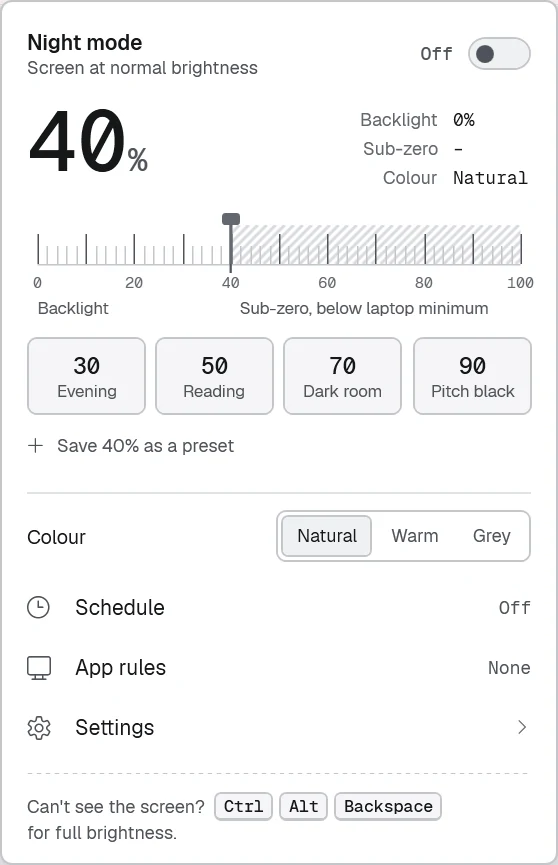
A small tray app for laptops. Dimming starts with the real backlight, which also saves battery. Once the backlight reaches its minimum, a full-screen colour filter covers everything, including the taskbar, menus and the mouse pointer.
- 0 – 40
Backlight. The laptop's own backlight goes down from where you set it to the hardware minimum.
- 40 – 100
Sub-zero. Past the laptop's minimum, a colour filter keeps dimming down to 4% of normal brightness. It never turns the screen fully black.
- Fallback
Overlay. On a desktop monitor the filter covers the whole scale. If the filter isn't available, a click-through overlay takes over.
- Presets: Evening 30, Reading 50, Dark room 70, Pitch black 90, plus your own.
- Warm or Grey: add an amber tint or remove the colour while dimming.
- Schedule: dims at bedtime with a gentle ease-in and turns off in the morning.
- App rules: pause dimming while a photo editor or video player is in front.
- Full brightness for a while: 30 seconds, 1 minute or 5 minutes, then it dims again by itself.
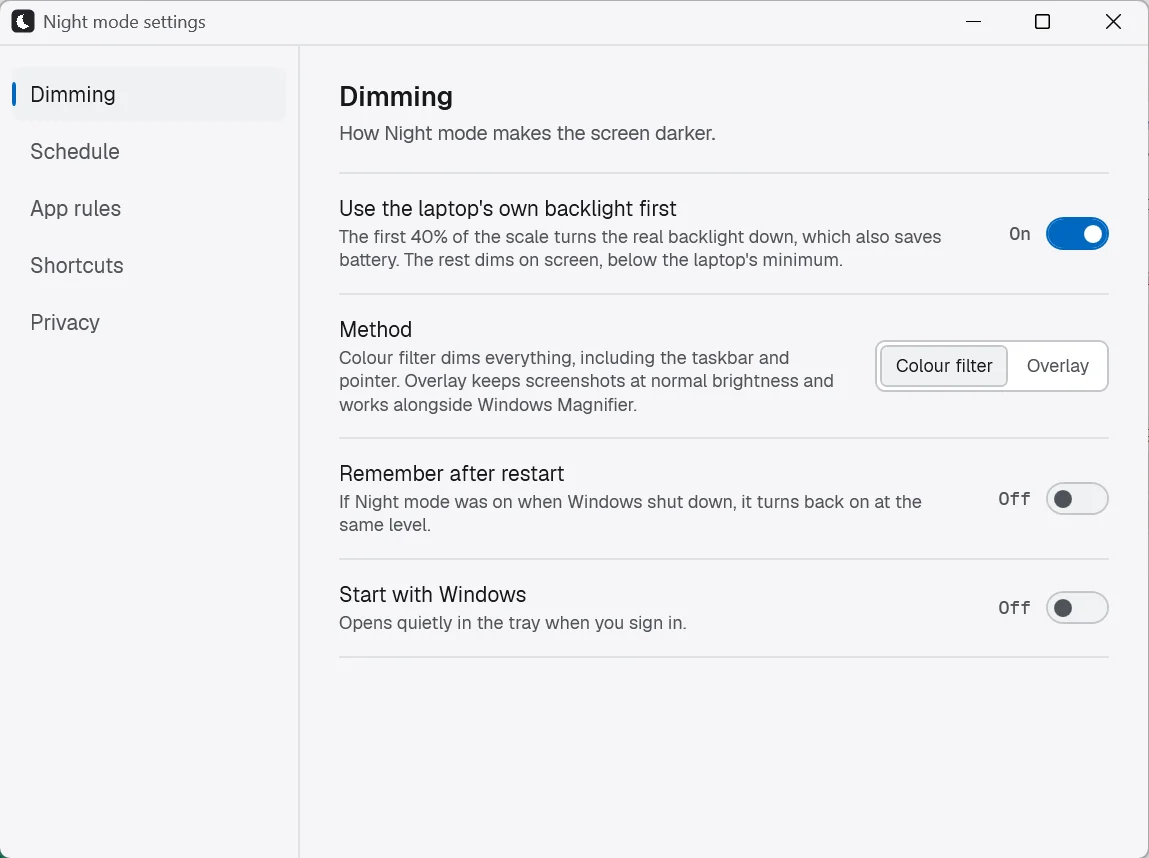
- Start with Windows and Remember after restart, both off until you switch them on.
| Shortcut | What it does |
|---|---|
| Ctrl Alt D | Turn dimming on or off |
| Ctrl Alt − / + | Darker or brighter, 5% at a time |
| Ctrl Alt S | Take a screenshot at normal brightness |
| Ctrl Alt Backspace | Full brightness right away, even if you can't see the screen |

Android · Google Play
Night mode for Android
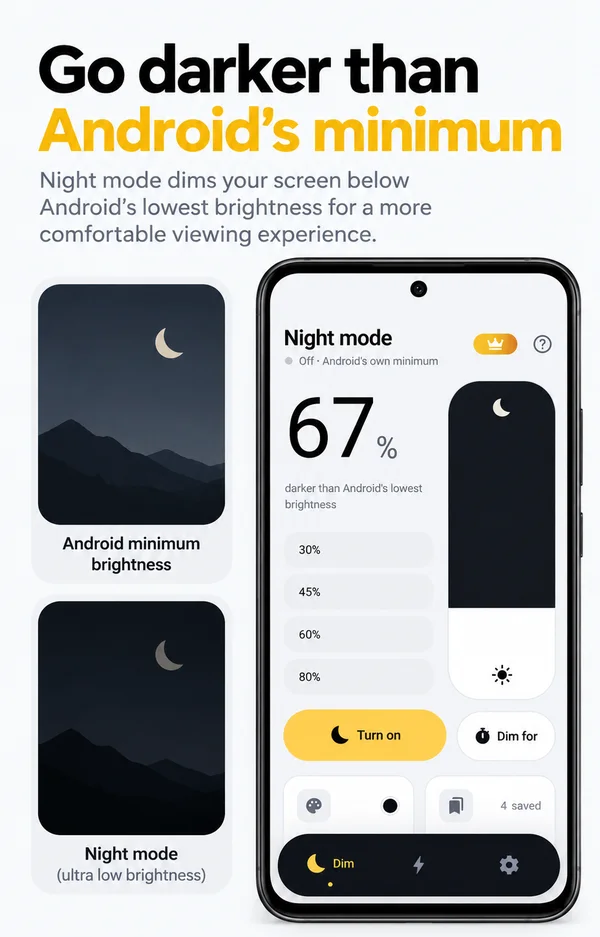
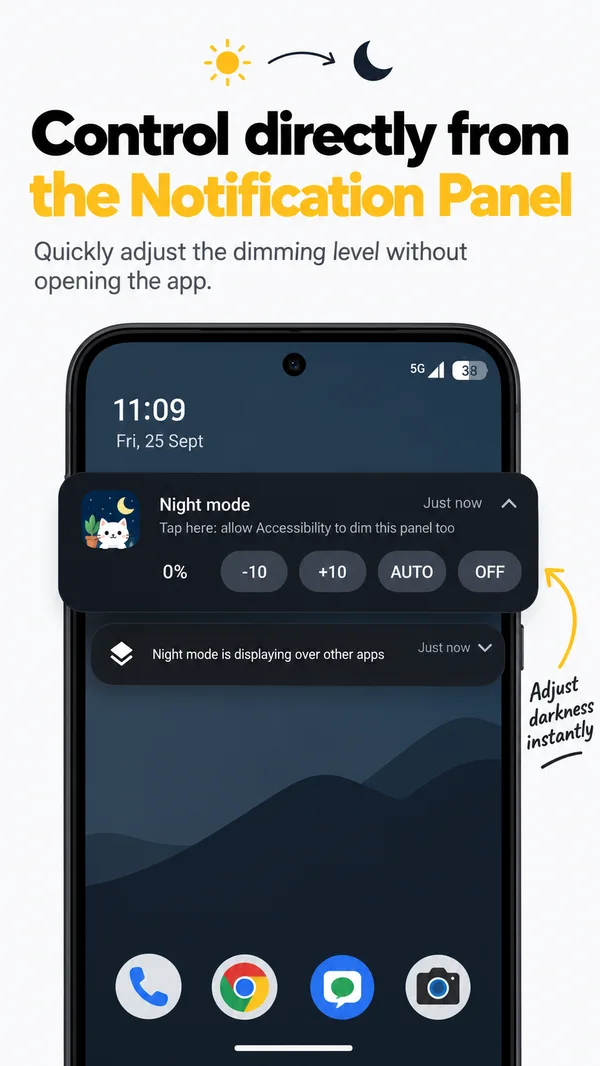
The same idea on your phone. Night mode adds an adjustable dark layer over everything on screen, including apps, videos, games and the home screen. Pull the shade down to dim and push it up to brighten.
- Darker than Android's minimum: you choose exactly how dark it gets.
- One tap from anywhere: controls in the notification and Quick Settings tiles.
- Dim for a while: pick a time and the screen comes back by itself.
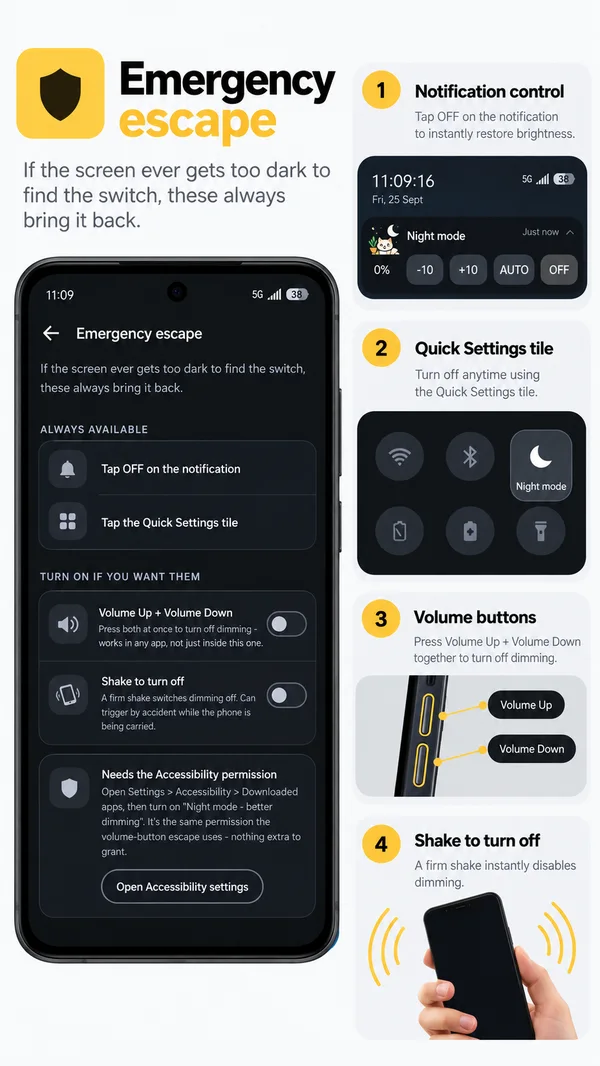
- Emergency off: shake the phone (on by default) or press Volume Up + Volume Down together.
- Private by design: no account, no analytics, no ads, works offline.
The optional Accessibility permission also dims the status bar, keyboard and lock screen. The app explains it and asks first. It never reads the text on your screen. Read the privacy policy.
Open source
Don't take our word for it. Read the code.
The full source of Night mode for Windows is public on GitHub under the MIT licence. You can check how it dims, confirm that it never connects to the internet, and build it yourself.
Nothing hidden
The app uses no third-party packages and makes no network calls. Your settings are a small JSON file in your own AppData folder.
Same file we published
Each release lists SHA-256 checksums, so you can confirm your download is the file we published.
Safe if it crashes
If the app ever crashes, Windows removes the filter, and the next launch restores your backlight.
# build it yourself (needs the .NET 10 SDK)
git clone https://github.com/madhavraj840/bunkwise-night
cd bunkwise-night
dotnet run --project checks   # dimming maths checks
dotnet build -c Release
Download and install
Ready in about two minutes.
No installer, no sign-up and no restart. Choose your device:
On Windows 10 or 11
-
01
Download the zip
If you're not sure which one to pick, take the first. It has everything built in.
Night mode for Windows Recommended61 MB · any 64-bit Windows 10 or 11 PC Small download0.4 MB · needs the .NET 10 Desktop Runtime
Both files are also on the GitHub release page, under Assets. -
02
Unzip it
Open your Downloads folder, right-click
NightMode-1.0.0-win-x64-full.zip, choose Extract All…, then click Extract. You can move the new folder anywhere, for example into Documents. -
03
Run NightMode.exe
Double-click
NightMode.exe. The first time, Windows may show a blue "Windows protected your PC" box. This happens because the app is new and not code-signed yet. Click More info, then Run anyway. Windows only asks once.Windows protected your PCMicrosoft Defender SmartScreen prevented an unrecognised app from starting…
More info
Don't runWindows protected your PCApp: NightMode.exe
Publisher: Unknown publisherRun anywayDon't runIllustration of the prompt. Click the highlighted parts.
Want to check the file first? Compare its SHA-256 with the one on the release page. In PowerShell, run
Get-FileHash .\NightMode-1.0.0-win-x64-full.zip. It should bed18b77f56e8ccf3d5505aaf729c4ae648116b874cf876535c3115d3b4139cfb7. -
04
Open it from the tray
Night mode doesn't open a big window. It sits in the system tray next to the clock. If you don't see the moon icon, click the ^ arrow, then click the moon to open the panel.

Hidden tray icons sit behind the ^ arrow. -
05
Dim, and keep it handy
Drag the scale or pick a preset. Anything past 40 is below your laptop's minimum brightness. To have the app ready every day, open Settings and turn on Start with Windows.
To uninstall, quit the app from its tray menu and delete the folder.
Lost in the dark? Ctrl + Alt + Backspace brings full brightness back.
On Android
- 01
Install from Google Play
Open Night Mode - Screen Dimmer on Google Play and tap Install.
- 02
Allow "Display over other apps"
Night mode needs this permission to draw the dark layer. The app shows you where to switch it on. Notifications are optional. They put the controls in your notification shade.
- 03
Pull the shade down
Drag down to dim and up to brighten. After that, use the notification or the Quick Settings tile, and you won't need to open the app again.
Questions
Frequently asked questions
How do I make my laptop screen darker than the lowest brightness?
Install Night mode for Windows. The first part of its scale (0–40) turns the laptop's real backlight down to the hardware minimum. The rest (40–100) uses a full-screen colour filter to keep dimming below that minimum, down to 4% of normal brightness.
Is Night mode free?
The Windows app is completely free and open source under the MIT licence. The Android app is free to download and works as a dimmer without paying. Optional Pro features such as Auto-Dim and schedules are a purchase through Google Play.
Is Night mode open source?
Yes, the Windows app is. Its full C# source is at github.com/madhavraj840/bunkwise-night, and you can build it yourself with the .NET 10 SDK.
Why does Windows say "Windows protected your PC"?
Microsoft Defender SmartScreen shows this box for new apps that aren't code-signed yet. Click More info, then Run anyway. The source code is public, and the SHA-256 checksums on the release page let you confirm the file is the one we published.
What if the screen gets too dark to see?
On Windows, press Ctrl Alt Backspace at any time for full brightness. This works even when you can't see anything. On Android, shake the phone (on by default), press Volume Up and Volume Down together, or tap Off in the notification.
Does Night mode work on Windows 10?
Yes. It runs on 64-bit Windows 10 and Windows 11. The recommended download includes everything it needs, so nothing else has to be installed.
Does it work on a desktop PC or an external monitor?
Yes. Backlight control needs a screen that Windows can dim, which is usually a laptop panel. On other screens, the colour filter does all of the dimming.
Do screenshots come out dark?
Press Ctrl Alt S to take a screenshot at normal brightness. Night mode lifts the filter, opens the Windows snipping tool and dims again afterwards. If you choose the Overlay method in Settings, all screenshots stay at normal brightness.
Does Night mode collect any data?
No. The Windows app works fully offline and makes no network connections. The Android app has no account, no analytics and no ads, and purchases are handled by Google Play.
Is it better than the Windows Night light setting?
They do different jobs. Night light only warms the colours; it doesn't make the screen darker. Night mode lowers the brightness below the laptop's minimum, and its Warm option can add an amber tint at the same time.
Is Night mode an eye-care app?
No. It's a screen dimmer for using your phone or laptop comfortably in the dark. It makes no medical claims and isn't a medical device.
Made by BunkWise
Found a bug, or want a feature?
Open an issue on GitHub so everyone can follow it, or email us. A real person reads every message.